
Nulaxy Full Aluminum Dual Folding Cell Phone Stand for Desk, Black | Height Angle Adjustable, Po
$9.99
View on Amazon →
Published 17 September 2026 · updated 2026-09-17 · by GimmickHub
Slow phone charging is almost never the phone's fault. Most modern devices can accept 20 W or more from the right adapter; the bottleneck is almost always the charger, the cable, or a mismatch between the two.
The short answer: phone charging speed is governed by three factors — your charger's wattage output, your cable's power rating, and your phone's supported charging protocol. If any one of them falls short, the whole chain slows to the weakest link. Understanding which link is broken — and how to fix it without overspending — is what this guide covers.
Wattage is the rate at which energy flows into your battery. One watt equals one volt multiplied by one amp, and charge speed scales with wattage up to the ceiling your phone's hardware accepts.
Battery capacity (measured in mAh) tells you how much energy the battery holds; wattage tells you how fast it fills. A 4,500 mAh battery charged at 45 W fills significantly faster than the same battery charged at 5 W — same cell, different rate.
Standard "slow" charging sits at 5 W. Most modern smartphones support at least 18–20 W, and flagship Android handsets routinely accept 45 W or higher. Apple's USB-C adapter is rated at 20 W for iPhone 12 and later; Samsung's Super Fast Charging 2.0 reaches 45 W on the Galaxy S22 series and above.
Worth knowing: a 100 W charger will not damage a phone capped at 25 W. The phone negotiates a safe limit using the USB Power Delivery handshake and draws only what it needs. A 65 W GaN charger makes sense if you also charge a laptop from it, but it offers no phone-charging advantage over a 30 W model otherwise.
Wattage also explains why your phone charges faster from 0% to 80% than from 80% to 100%. The battery management system accepts peak wattage during the initial phase, then deliberately reduces the charge rate as the battery approaches full — a safety measure that protects cell chemistry at high states of charge.
Cables have wattage ratings just like chargers, and a cheap lead bought as an afterthought can cap you at 5–10 W regardless of what the adapter sends.
Three things to check on any cable:
Maximum power rating. A cable rated at 5 V/1 A carries only 5 W. For phones, look for cables rated to at least 60 W; for charging a laptop from the same lead, 100 W is the safer choice.
Certification. USB-IF certified cables carry a verified mark confirming they meet the published USB standard. For iPhones, Apple MFi certification is the only reliable guarantee of full-speed charging without compatibility warnings.
Connector type. USB-A to USB-C cables cannot carry USB Power Delivery at full speed. USB-C to USB-C is required for anything above 18 W on most phones.
Cheap uncertified cables sometimes lack the e-marker chip that reports their true rating to the charger. Without it, some chargers push more current than the cable can safely handle, generating heat and — in rare cases — creating a fire hazard. Buy certified cables from identifiable brands; the price difference is modest.
The market is packed with branded fast-charging names. Here is what they actually mean and which devices benefit:
| Standard | Max Wattage | Key Compatible Devices |
|---|---|---|
| USB PD (standard) | 18–100 W | Most modern smartphones, tablets, laptops |
| Apple 20 W USB-C | 20 W | iPhone 12 and later |
| Apple MagSafe wireless | 15 W | iPhone 12 and later |
| Samsung Super Fast Charging 2.0 | 45 W | Galaxy S22 and later |
| Qualcomm Quick Charge 4+ | Up to 100 W | Snapdragon Android flagships |
| Standard Qi wireless | 5–15 W | Most Qi-compatible smartphones |
The practical rule: USB Power Delivery is the universal standard. A USB-C PD charger rated to 30 W charges iPhones quickly, covers most Android flagships at a good pace, and works with tablets — all from one plug. Proprietary chargers squeeze out extra speed on their matched phones but behave like a standard PD charger on everything else.
Gallium nitride (GaN) chargers deliver the same wattage as traditional silicon adapters in a noticeably smaller body, with less heat output. A 30–65 W GaN USB-C PD charger covers phones, tablets and ultrabooks from one plug — the most versatile single charging upgrade most people can make.
Even with a fast-charging cable, the wall adapter sets the ceiling. Check the output label printed on the plug body. "5 V ⎓ 1 A" means 5 W; "5 V ⎓ 2 A" means 10 W — well below what modern phones can accept.
The adapter also needs to negotiate voltage. USB PD chargers step up from 5 V to 9 V or 12 V to deliver higher wattage; older fixed-voltage adapters cannot do this. Even a reasonable-looking amperage rating on a legacy plug will never enable fast charging.
Multi-port adapters split their wattage across ports. A 65 W two-port adapter may deliver only 45 W on one port and 20 W on the other when both are in use — the headline figure is total output, not per-port. Always check the per-port spec before buying.
Temperature is a useful quality signal. An adapter running warm is normal; one that becomes genuinely hot to the touch is wasting energy as heat rather than delivering it to the battery. A GaN adapter runs noticeably cooler than an older silicon design at the same wattage, which matters during long overnight charges.
Wireless charging is slower than wired by design — energy is lost as heat during transfer between the pad's transmitter coil and your phone's receiver coil. Standard Qi tops out at 7.5–15 W depending on device; Apple MagSafe reaches 15 W on iPhone 12 and later when paired with a certified MagSafe charger.
Alignment is critical and often overlooked. A phone lying at even a slight angle on a wireless pad charges more slowly and generates more heat; the coils need to be centred precisely. A dedicated MagSafe stand eliminates the guesswork by snapping the phone into the correct position magnetically every time.
Thick or metal-backed cases can also interfere with wireless charging coils. If charging stops and starts intermittently on a pad, removing the case is the first thing to try before assuming the pad or phone is at fault.
For a desk wireless charging setup, the COOPER MagStand Magnetic Phone Stand for Desk is purpose-built for this: a MagSafe-compatible tripod with a weighted base, strong magnetic alignment, 9–13 inch height adjustment, and confirmed iPhone 17 compatibility. The OMOTON TP02 Magnetic Phone Tripod for MagSafe offers similar precision alignment with a 360° pivot and a three-way design that functions as both a free-standing mount and a clamp — practical if you switch between charging and angling the phone for video calls during the day.
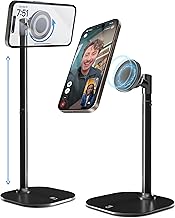
For wired desk charging, a stable stand prevents port strain and keeps the screen readable without touching the cable. The Nulaxy Full Aluminum Dual Folding Cell Phone Stand — machined from full aluminium with a dual-folding frame, height- and angle-adjustable positioning, and an anti-slip base — holds the phone securely while the cable runs clear of the base. The LISEN Cell Phone Stand is a compact desk alternative with a smaller footprint for tighter workspaces.
Before spending anything:
Every product linked from this page meets a 4.4-star rating floor. For cables and chargers we look for USB-IF or MFi certification and clearly labelled per-port wattage. For desk accessories — stands and MagSafe mounts — we look for confirmed charging protocol compatibility, stable base construction, and adjustability that suits a real desk. Price caps keep every recommendation within sensible budget ranges for accessories solving a defined problem.
Worth reading if your phone regularly takes two or more hours to charge from empty, you are still using a USB-A plug inherited from an older device, or you have recently switched to wireless charging and want to understand the speed difference versus a cable.
Skip most of it if you already own a USB-C GaN charger rated at 30 W or above, use a certified cable, and your phone reliably charges from empty in around 90 minutes or less. You have already closed the main gaps — further gains from here are marginal.
![Lamicall Bike Motorcycle Phone Mount Holder - [1s Quick Lock] | Bike Cell Phone Holder Clip, Bicycle Scooter H](https://m.media-amazon.com/images/I/71Wz74s6BoL._AC_UY218_.jpg)

No — the phone's battery management controller negotiates the safe current level and only draws what it can handle. Faster charging does produce slightly more heat, which can affect long-term battery health over hundreds of charge cycles. To minimise this, avoid charging in hot environments, remove thick insulating cases during fast charging, and don't leave the phone sitting fully charged on a fast charger for extended periods.
Yes, safely. USB Power Delivery is a negotiated standard: the phone tells the charger how much wattage it can accept, and the charger delivers exactly that amount regardless of its own maximum rating. A 100 W charger connected to a phone capped at 25 W charges at 25 W — no faster, and no risk of damage. It is a sensible all-in-one option if you carry one charger for both devices.
Energy is lost as heat during transfer between the charging pad's transmitter coil and your phone's receiver coil — an inherent physics limitation, not a fault. Standard Qi wireless runs at 5–15 W; Apple MagSafe reaches 15 W on supported iPhones. Both are significantly below what a 30 W wired USB-C PD connection delivers, though MagSafe's magnetic alignment reduces wasted energy compared with misaligned standard Qi.
Replace your wall adapter with a USB-C GaN charger rated to at least 30 W and pair it with a USB-C to USB-C cable rated for 60 W or more. For most modern smartphones this combination unlocks fast charging immediately without changing any settings, and a GaN charger is compact enough to carry daily. It is the change with the highest impact for the lowest outlay.
As an Amazon Associate we earn from qualifying purchases. Prices and availability are accurate as of the date shown and are subject to change — the price on Amazon at checkout is the one that applies.
Buying tech gifts under $50? Here's how to choose gadgets that genuinely get used every day — from audio to charging to desk kit.
The best car tech for UK drivers doesn't need to be expensive. Find out what to look for in phone mounts, tyre inflators, and car
The best desk setup upgrades for your home office: clamp lamps, monitor light bars, key specs and buying traps explained. UK price